Run a complete prepared example
This guide takes you from a supplied model to a fresh numerical result you can inspect and download. Anyone can run the public examples. Use the RLC circuit example to follow along: its current, charge and forcing-voltage signals make the connection between blocks and results easy to see.
Choose Read beside model above to keep these instructions in the left help panel. The ? toolbar button opens or closes help without replacing the selected model. Open Full Page gives the article its own browser page.
The public viewer presents prepared models with read-only parameters. Edit with Pro opens the selected example in the authenticated Design editor when you want to change parameters, create connections, import a file or save an edited model.
Open the supplied RLC model
- Open prepared examples.
- In Example, choose RLC circuit: current and charge. Its complete model loads automatically; no separate load-blocks action is needed.
- Check the binding beneath the status: 12 prepared blocks, 15 connections and a 0–25 s window.
- Select a block in the diagram to inspect its parameters and connections. These values describe the supplied calculation and cannot be changed in the public viewer.
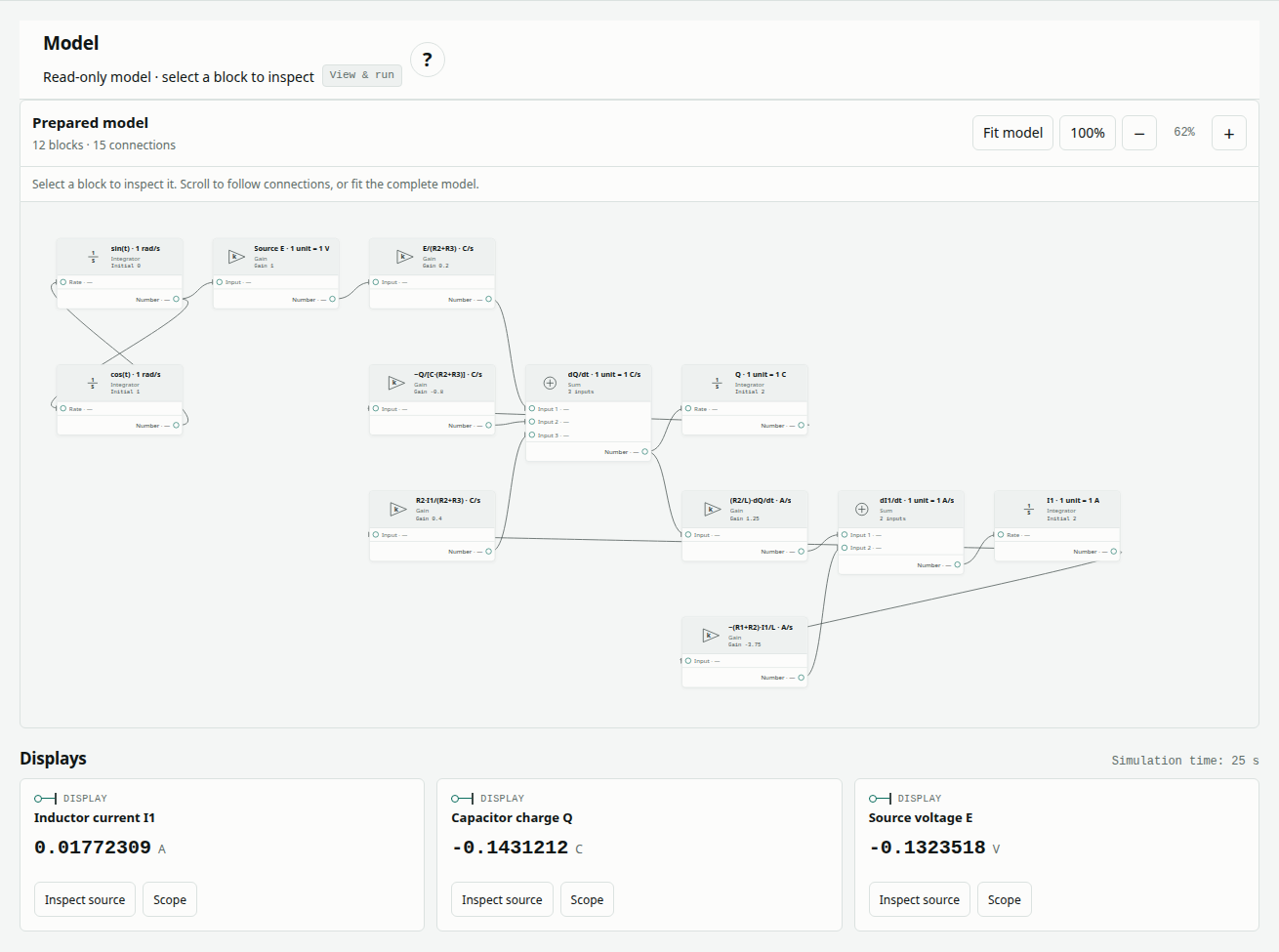
Use the diagram's fit, zoom and scrolling controls to inspect the complete graph. The original RLC model data contains all blocks and connections. The public viewer does not import model files; file import is available in the Pro editor.
Read a block and its connections
A Gain multiplies an input, a Sum combines its connected inputs and an Integrator stores a state. In the RLC example, the connected state equations determine current and charge over time. Select a block and follow its incoming connections before interpreting its output.
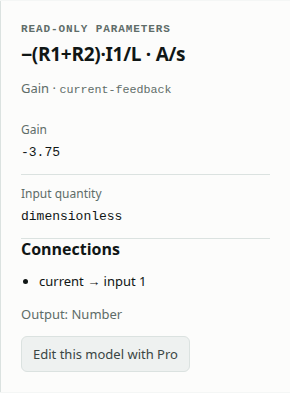
The RLC article explains every coefficient and the explicit mapping between numerical quantities and SI units. Its equations and parameter tables remain available without running the model.
Run and inspect Display and Scope
- Choose Run prepared model. Lemonergy solves the supplied graph with its Rust/WebAssembly engine.
- Wait for Passed or Failed and read the trace-completeness result. This is a fresh solve on your device, not playback of the historical report.
- Read every row in the numerical check table. Check the signal units, final model value, reference, maximum error, tolerance and result.
- Move Display time to inspect the numerical Display outputs at retained solver times. This changes the inspected instant; it does not alter the calculation.
- Choose a signal's Scope button or select it in Scope signal. Inspect both the model/reference overlay and the model-minus-reference error plot. Repeat for current, charge and source voltage.
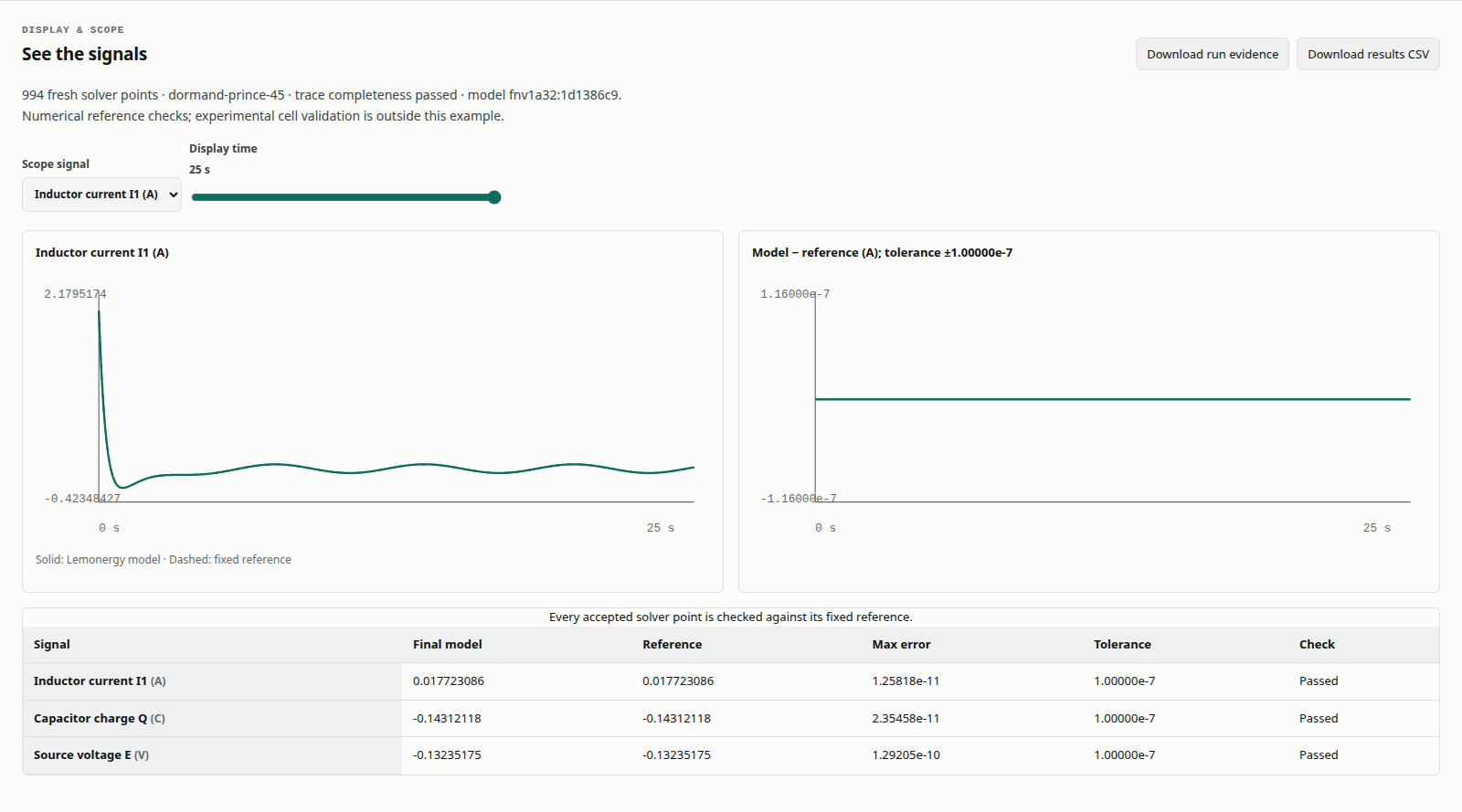
The comparison checks the complete supplied problem, including its settings and required observation window. Read Understand simulation results and accuracy to distinguish a matching endpoint from a complete trace check.
Download the result and original model data
| Public action | What it provides | When to use it |
|---|---|---|
| Download run evidence | The prepared graph, fresh raw result, comparison, limits and run information | Review the calculation and its exact inputs |
| Download results CSV | Model, reference and error values at retained solver times | Inspect switching instants or analyze the trace in a table |
| Download the model file under Model, method and references | The original supplied model artifact | Keep the example data or open it later in the Pro editor |
Evidence and CSV become available after a successful solve. A completed solve can have a failed comparison; that result is still useful evidence. Choosing another example clears the current display and requires a new run for its result downloads. Downloading the original model file does not insert the current run into that historical artifact.
Edit one parameter with Pro
Choose Edit with Pro to open the selected example in the Design editor. The Design app checks your authenticated access before editing. Its canvas supports the existing Load reference blocks, Open, Save and Run blocks & compare workflow.
For a controlled experiment, choose insulated rod heating, open it through Edit with Pro, and select Heat input · W in the editor. Change 18 W to 19.8 W. Predict a 10% larger temperature rise over the same interval, then choose Run blocks & compare.
The reference remains the original 18 W problem. The changed model can therefore be internally consistent while failing that fixed comparison. Editing clears its previous comparison until a new run finishes. In the Pro editor, Undo followed by another run, or Load reference blocks followed by another run, restores the original calculation. The public prepared example is unaffected by your variant.
Save and reopen a variant in Pro
In the Pro editor, Save keeps editable blocks, settings and the matching last result in one .lemon.json file. A result from before a parameter change is omitted because it no longer describes the current inputs. Export evidence JSON and Export comparison CSV retain the editor's corresponding numerical evidence.
Choose Open in the Pro editor to load a saved file. A Saved result message means the retained trace was checked and displayed; it does not mean a new simulation ran. Choose Run blocks & compare to solve it again. The original downloadable examples can contain historical results, so keep that distinction when opening them.
The public viewer has no file import or model-save controls. Use its result downloads to keep a public run and the Pro editor to continue model development.
Resolve common problems
| What you see | What to check |
|---|---|
| Public Run is disabled | Wait for the prepared model to load; choose the example again if loading reports a failure |
| A parameter cannot be changed | Public parameters are read-only; use Edit with Pro for a variant |
| Evidence and CSV downloads are disabled | Complete a fresh solve of the currently selected example |
| The final value agrees but the comparison fails | Check every signal, the full interval, events and solver settings |
| A downloaded model shows an older result in Pro | Distinguish its saved evidence from a new Run blocks & compare solve |
| A block is outside the viewport | Use fit, zoom or scroll to inspect the rest of the prepared graph |
Explore connected examples
Continue with battery pulse response, lumped heating or two-cell heat exchange. Each article includes the complete equations, model, figures, numerical checks and references. Its controlled-change section identifies the Pro editing steps explicitly.