Release a fixed amount of heat
A heat source should stop when its specified energy has been delivered. Here a 20 J/K thermal mass receives 200 W for ten seconds, starting at 2 s. You will follow the seed command through a latch and timer, reproduce the temperature rise and account for all 2,000 J.
The model is tr-finite-release, reference version 1. Its 26 prepared blocks and 30 connections combine continuous thermal states and sampled logic in Lemonergy's Rust/WebAssembly engine.
Open the prepared model
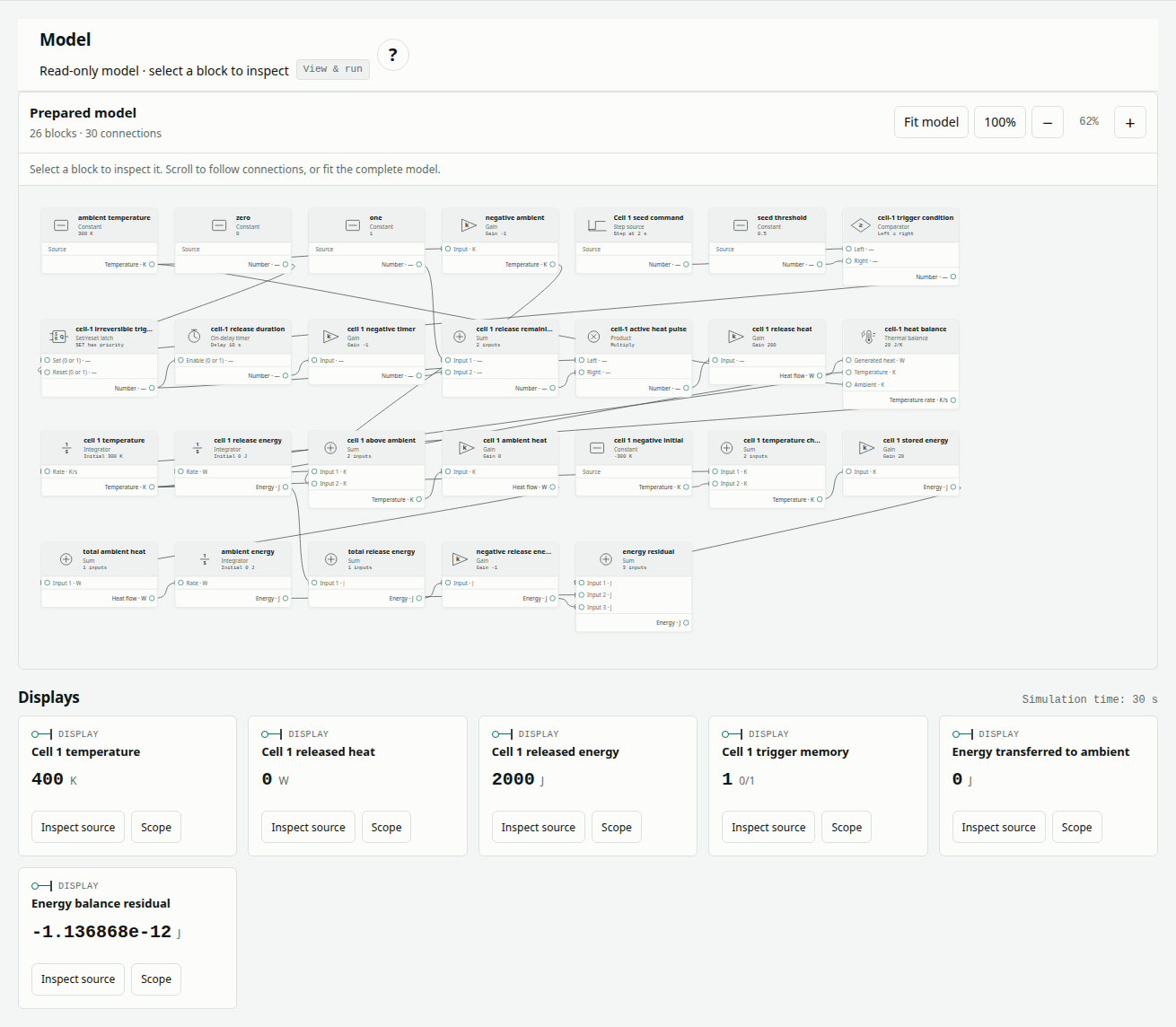
Open prepared examples and choose Single cell: finite heat release. The complete supplied model loads automatically. Choose Run prepared model to calculate a fresh result with Rust/WebAssembly, then select blocks to inspect their read-only parameters and connections. You can download the original model data for reference.
The public viewer lets you inspect, run and explore this prepared example. To change parameters, connect blocks, import a file or save an edited model, choose Edit with Pro. The Design app opens the selected example in its authenticated Pro editor; the workflow guide explains both experiences.
Define the pulse and temperature response
With no ambient loss or neighboring cell, the heat balance and analytical solution are:
C dT/dt = P(t)
P(t) = 200 W for 2 ≤ t < 12 s; otherwise 0 W
T(t) = 300 + 10 clamp(t − 2, 0, 10) K
Erelease(t) = 200 clamp(t − 2, 0, 10) J
Dividing 200 W by 20 J/K gives a heating rate of 10 K/s. Ten seconds of heating raises the temperature by 100 K. The trigger is a time-seeded command, not a temperature threshold. A latch remembers the seed; a timer ends the pulse without resetting that memory.
| Quantity | Value | Role |
|---|---|---|
| Heat capacity | 20 J/K | Converts heat to temperature rate |
| Initial temperature | 300 K | Integrator initial value |
| Release power | 200 W | Heat applied while the pulse is active |
| Seed time | 2 s | Step changes from 0 to 1 |
| Release duration | 10 s | On-delay timer setting |
| Sample time | 0.1 s | Latch and timer update interval |
| Ambient conductance / temperature | 0 W/K / 300 K | No heat loss |
| Observation window | 0–30 s | Includes before, during and after release |
Follow the block chain
Select a block in the prepared diagram to inspect its read-only parameters and connections. The inventory is 5 Constant, 6 Gain, 6 Sum, 3 Integrator, and one each of Step, Compare, Boolean latch, On-delay timer, Product and Thermal balance.
| Block | Parameter or connection | Function |
|---|---|---|
ambient-temperature, zero, one · Constants | 300 K, 0, 1 | Supply ambient temperature, latch reset and pulse logic levels |
negative-ambient · Gain | Gain −1 | Form −300 K for the ambient-loss branch |
cell-1-seed · Step | Before 0; after 1; at 2 s | Issue the seed command |
seed-threshold · Constant | 0.5 | Level for the command comparison |
cell-1-trigger · Compare | Greater than or equal; seed and threshold inputs | Generate the latch set condition |
cell-1-latched · Boolean latch | Sample time 0.1 s; initial 0; reset wired to zero | Remember the seed |
cell-1-release-complete · On-delay timer | Sample time 0.1 s; delay 10 s | Signal the end of release |
cell-1-negative-timer · Gain | Gain −1 | Negate timer output |
cell-1-release-remaining · Sum | 1 minus timer output | Enable heat until completion |
cell-1-release-gate · Product | Latch × release-remaining; scale 1 | Form the finite pulse |
cell-1-release-heat · Gain | Gain 200; heat output | Convert the pulse to watts |
cell-1-temperature-rate · Thermal balance | Heat capacity 20 J/K; ambient conductance 0 | Calculate temperature rate |
cell-1-temperature · Integrator | Initial 300 K; rate gain 1 | Accumulate temperature |
cell-1-release-energy · Integrator | Initial 0 J; rate gain 1 | Integrate released heat |
cell-1-above-ambient · Sum; cell-1-ambient-heat · Gain | T − 300 K; gain 0 W/K | Calculate the zero ambient heat loss |
cell-1-negative-initial · Constant; cell-1-temperature-change · Sum | −300 K; two inputs | Subtract the initial temperature |
cell-1-stored-energy · Gain | Gain 20 applied to T − 300 K | Calculate stored-energy change |
total-ambient-heat · Sum; ambient-energy · Integrator | One input; initial 0 J, gain 1 | Accumulate ambient transfer |
total-release-energy · Sum; negative-release-energy · Gain | One input; gain −1 | Form the negative release total |
energy-residual · Sum | Stored change + ambient energy − release energy | Check conservation |
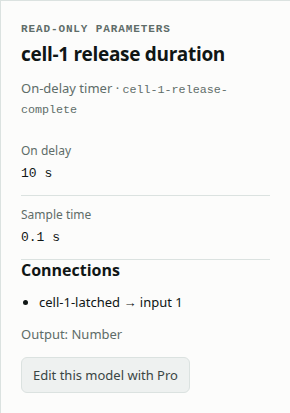
This inventory includes all 26 blocks. Energy-accounting branches are connected measurements of the same thermal state, not additional heat sources.
Run and inspect the event boundaries
- Confirm the loaded binding: 26 blocks, 30 connections and 0–30 s.
- Keep the reference solver settings below, including the 0.1 s maximum step and sampled-block times.
- Choose Run prepared model. Confirm the status and full-trace completeness pass.
- Select Cell 1 released heat in Scope signal. Check that heat is on at 2 s and off at 12 s.
- Inspect Cell 1 temperature, Cell 1 released energy and Cell 1 trigger memory. The memory remains 1 after heating stops.
- Inspect Energy balance residual. Choose Download results CSV to review exact event rows and Download run evidence to retain the model and current comparison.
| Solver setting | Reference value |
|---|---|
| Method | Dormand–Prince 4(5) |
| Initial / minimum / maximum step | 0.001 / 1e−10 / 0.1 s |
| Relative / absolute tolerance | 1e−11 / 1e−12 |
| Maximum steps | 100,000 |
| Algebraic tolerance / iteration limit | 1e−10 / 30 |
| Implicit tolerance / iteration limit | 1e−10 / 20 |
After the run, move Display time to inspect numerical Display outputs at retained solver times. Choose a signal’s Scope button, or use Scope signal, to view its full trajectory and reference-error plot. Scrubbing changes the inspected time, not the prepared model or its result.
Read the expected result
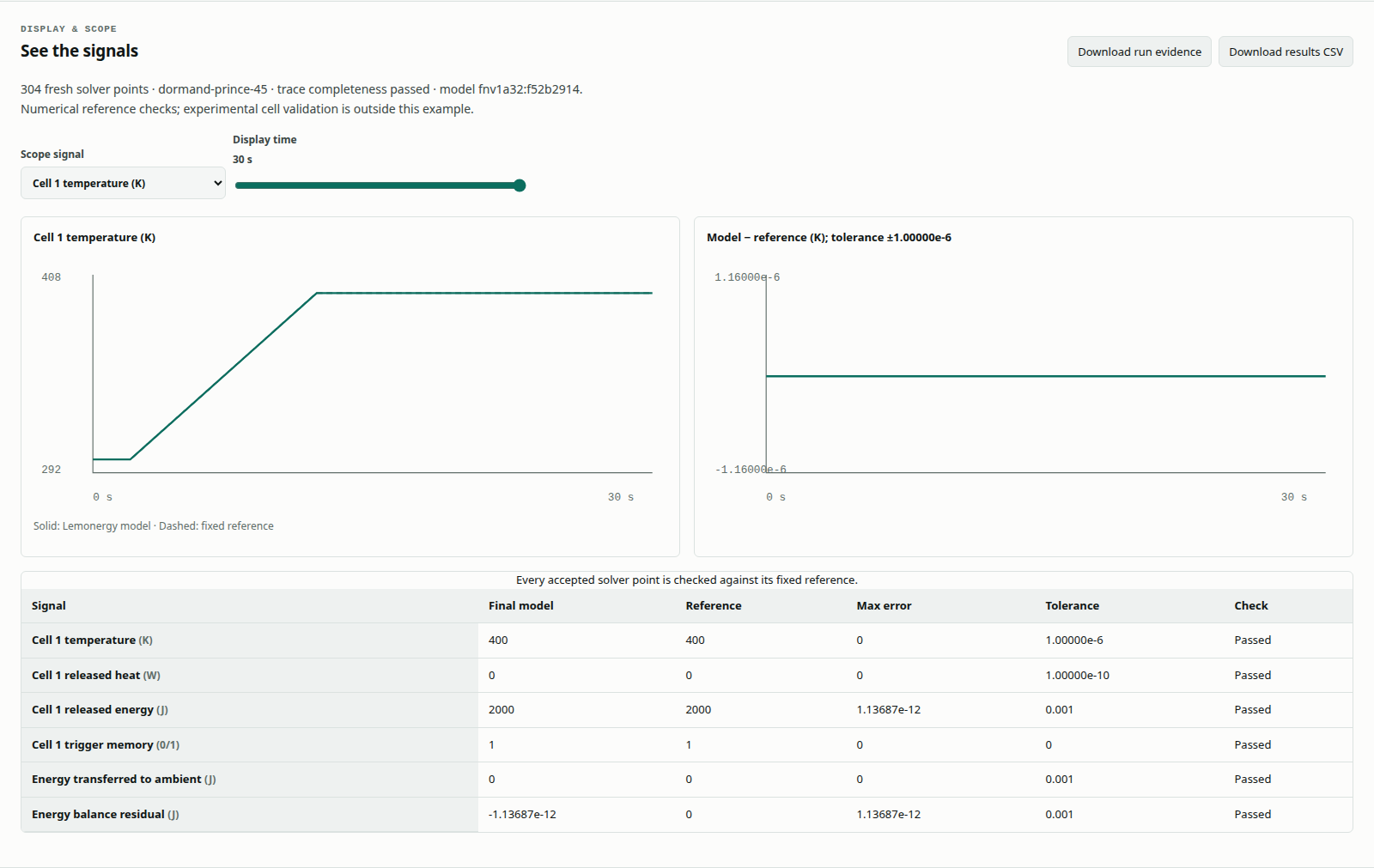
Event outputs are right-continuous: heat is already 200 W at 2 s and already zero at 12 s. Temperature and accumulated energy stay continuous. These analytical checkpoints show the distinction:
| Time (s) | Temperature (K) | Heat (W) | Released energy (J) | Trigger memory |
|---|---|---|---|---|
| 0 | 300 | 0 | 0 | 0 |
| 2 | 300 | 200 | 0 | 1 |
| 7 | 350 | 200 | 1,000 | 1 |
| 12 | 400 | 0 | 2,000 | 1 |
| 30 | 400 | 0 | 2,000 | 1 |
The retained thermal report, generated 1 October 2026 at 18:52:33 UTC, passed with 304 output points. Maximum temperature and heat errors were zero; maximum release-energy error and energy residual were approximately 1.14e−12 J. These historical metrics are distinct from a new run shown in the current interface screenshots.
The fixed gates are 1e−6 K for temperature, 1e−10 W for heat, 1e−3 J for energy and exactly zero latch error. The full 30 s window, every accepted point and every 0.1 s event instant must be retained. Matching final temperature alone is insufficient: a late pulse can deliver the same total energy at the wrong time.
Change the pulse power (Pro)
Choose Edit with Pro to open this example in the authenticated Design editor. The following changes require Pro editing. Use Run blocks & compare there to solve the edited graph; the public prepared model stays unchanged.
Select cell-1-release-heat and change Gain from 200 to 220, keeping the duration at 10 s. The edited model should release 2,200 J and reach 410 K. It should fail against the unchanged 200 W reference while its own energy residual remains near zero.
Save the variant separately. Restore Load reference blocks and rerun to recover the original case. This experiment distinguishes a different but internally balanced input from an error in the pulse or energy accounting.
Troubleshoot and assess the scope
| Observation | Check |
|---|---|
| Heating begins immediately | Step seed time must be 2 s |
| Heating never stops | Timer delay and the 1 − timer branch |
| Trigger memory falls to zero at 12 s | The timer gates power; it should not reset the latch |
| Correct final temperature but a failed comparison | Exact event instants, sample-time settings and full trace coverage |
| Residual changes after editing heat capacity in Pro | The Thermal balance capacity and stored-energy gain must describe the same C |
This is prescribed rectangular heating of one uniform thermal mass. It does not infer reaction heat from temperature or represent measured cell behavior. A passing energy balance establishes numerical consistency within this model, not physical validation or safety performance.
References and related reading
The retained thermal report records the historical verification. The external architecture sources attached to this article provide background; MATLAB/Simscape was not executed for that retained evidence. Continue with triggered heat propagation, where a neighboring temperature activates a second pulse, or read validation results to interpret the full-trace gates.