Summary
Created 12 October 2026; updated 19 October 2026. The prepared model was run in the native Lemonergy workspace on the released application. The checks verified all three numerical results, each cell’s displayed temperature, playback, saving, downloading and reopening, and the screenshots below. This validates the software workflow and numerical replay, not a physical flight test.
The middle cells of a tightly packed UAV battery have less surface exposed to air. This example compares fourteen pouch cells under the same illustrative flight, using a tight stack, 2 mm cooling gaps and an assumed thermal spreader. Lemonergy shows how the average temperature of each cell changes during the mission.
The recorded tight-stack peak is 53.94°C, compared with 41.02°C for the declared gap boundary and 46.19°C for the assumed spreader boundary. Better access to a cooling path helps this model; these values are not measurements of a finished UAV pack.
Open the interactive 3D model in Lemonergy · Download the native model
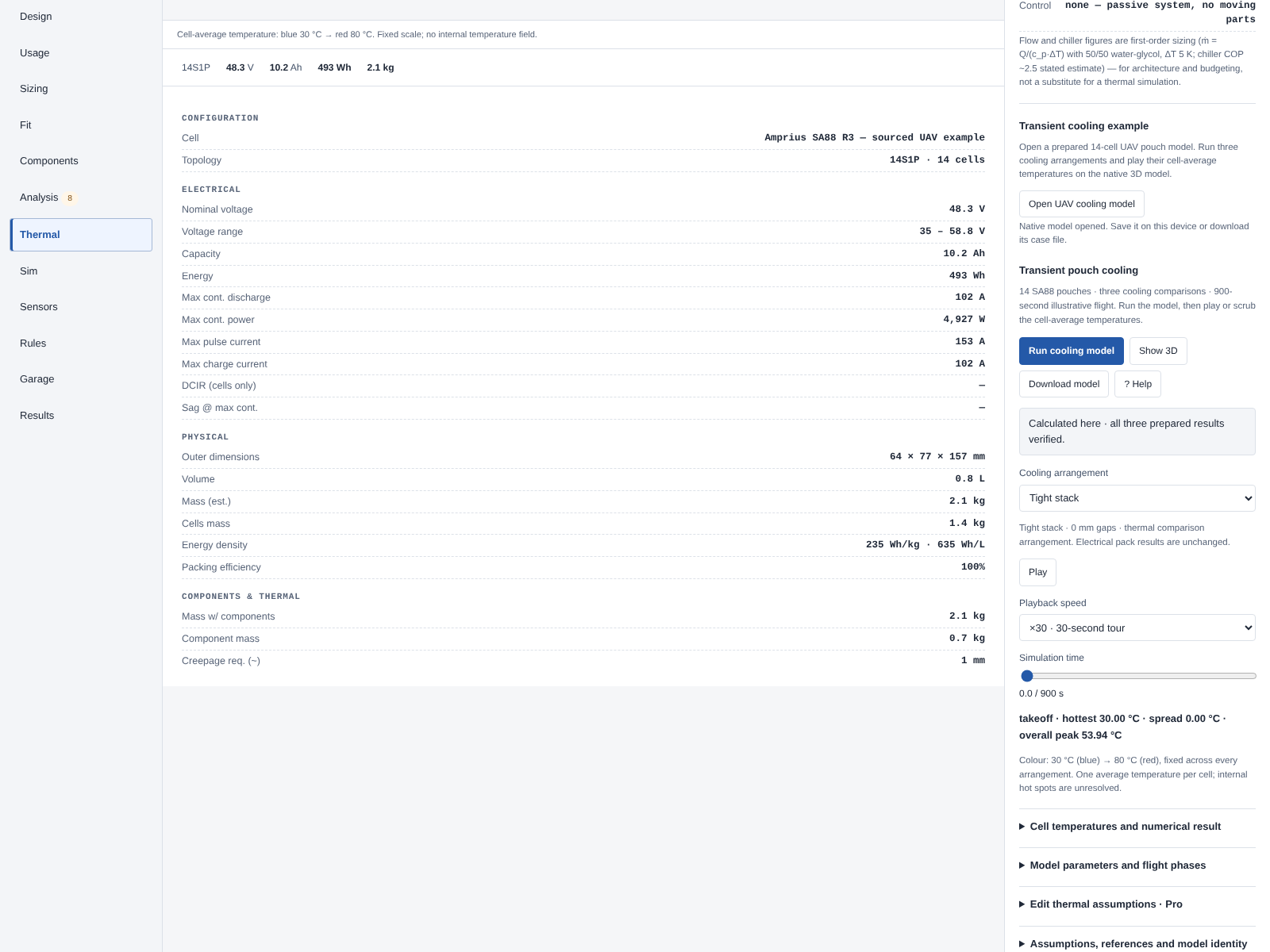
Open this model in interactive 3D
Run the example
- Open the model. Use the link above. Lemonergy opens the Thermal workspace with the named UAV pouch-stack cooling — illustrative 14S1P example. Check that the example name and fourteen cells are visible; it is a separate prepared case, not a thermal result for an unrelated pack already open in another tab.
- Run the calculation. Select Run cooling model. Wait for the current-browser calculation to complete. Opening the model identifies its prepared inputs and expected results; it does not establish that the solver has already run in your browser.
- Show the model. Select Show 3D. The existing Lemonergy pack view displays the selected study arrangement. Rotate the model to inspect the pouch stack. A screenshot in this article is an illustration; the interactive model opens using its explicit link.
- Choose a cooling arrangement. Use Cooling arrangement to compare Tight stack, 2 mm duct gaps and Prescribed spreader path. Read the selected arrangement name beside the model. A displayed gap is a study assumption, not proof that air reaches the cell faces.
- Follow the mission. Set Simulation time to 0 s, then 780 s. Use Inspect cell to inspect a middle cell such as cell 8. In the tight stack, all cells start at 30°C; at 780 s the middle cells are approximately 53.9°C and the ends approximately 40.6°C.
- Play and pause. Select Play to advance through the calculated timeline. Use Playback speed to change playback speed, or drag Simulation time to a particular instant. Playback displays the calculation's stored frames; it does not repeatedly rerun the solver.
- Keep the model. Select Download model for a portable JSON backup of the complete native case. Save case in Cases keeps the model in the Designer's case library: on this device when you are signed in, and only for the current tab when you are not signed in (the workspace banner says so; download before closing or reloading). In a fresh Designer session, use Cases → Import case file, choose the downloaded file, then run the thermal study again. Reloading or reopening restores inputs and result identities; run again to obtain a fresh current-browser calculation.
- Read alongside the model. Select Help to open this guide on the left. Close Help to restore the workspace width. Open Full Page opens this article at its public Wiki address.
Prepared examples can be opened, run, played, saved and downloaded without Pro editing access. Editing an opened model uses Lemonergy's normal Pro access policy. Saving in the case library is different from downloading a backup, and nothing is stored on a Lemonergy server.
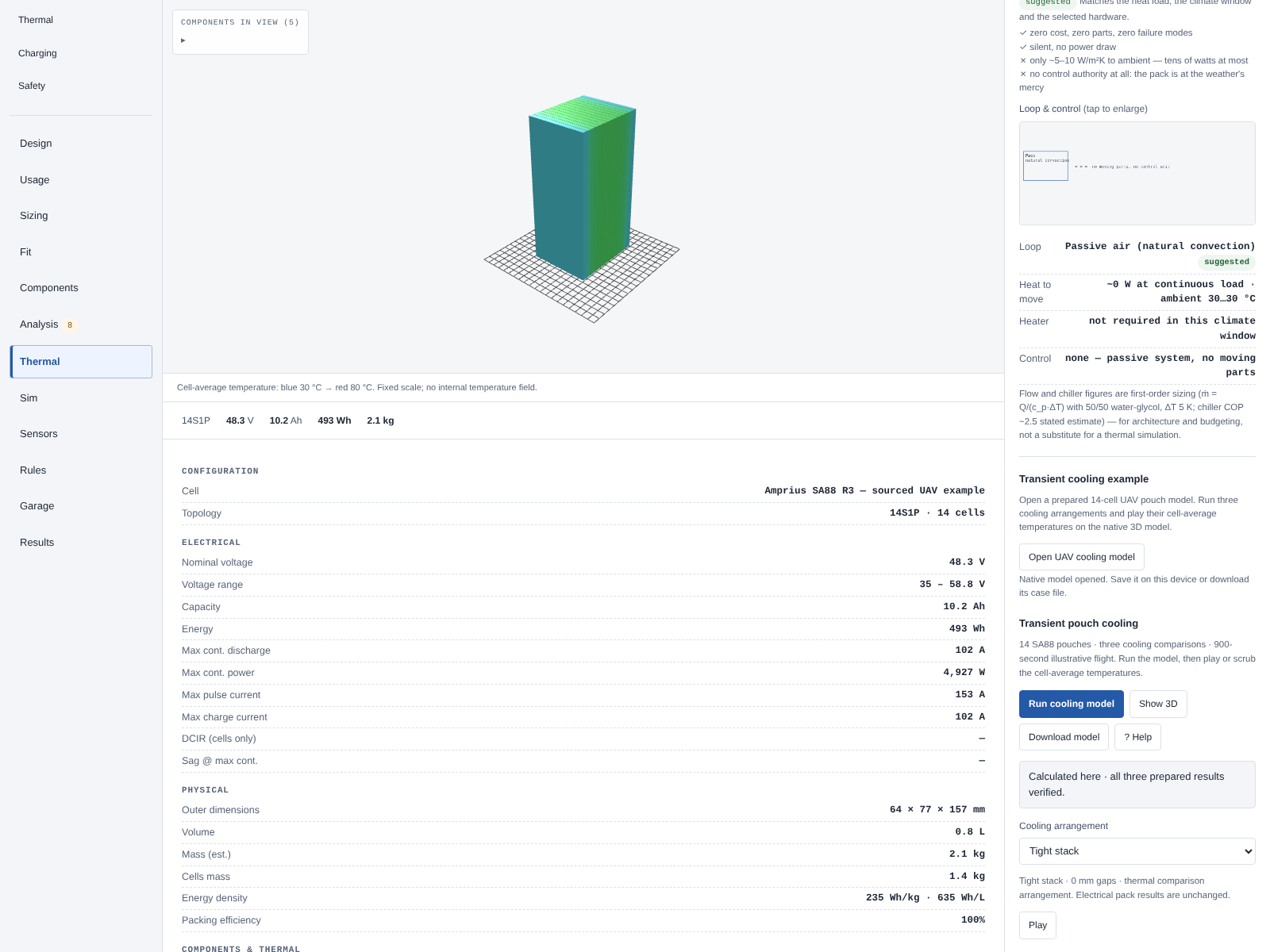
Open this model in interactive 3D
What to expect
These are the retained reference results for the original three arrangements. A successful fresh run must match their bound numerical results. If an engineering input is changed, the output belongs to that changed model and must not be labelled as a verified prepared reference.
| Cooling arrangement | Peak cell average, °C | Peak time, s | Largest cell spread, °C | Added hardware allowance, kg | Cooling power allowance, W |
|---|---|---|---|---|---|
| Tight stack | 53.944 | 780 | 13.389 | 0.000 | 0.0 |
| 2 mm duct gaps | 41.017 | 90 | 0.000 | 0.100 | 5.0 |
| Prescribed spreader path | 46.192 | 90 | 6.700 | 0.200 | 5.0 |
Peak temperature and largest spread may occur at different times. The 60°C screen is an authored comparison threshold, not a manufacturer surface/core limit or a safety verdict. Cooling hardware and power are allowances, not a qualified clamp, duct, fan or cold-plate design.
Prepared model versus a fresh result
| State | What it establishes | Next action |
|---|---|---|
| Prepared model opened | Inputs, source references, expected kernel and result identities are present | Select Run cooling model |
| Calculation completed in this browser | Rust/WebAssembly has calculated the current thermal definition | Inspect cell temperature, 3D and the timeline |
| Saved, downloaded or re-imported model reopened | Model inputs and bindings were restored and checked | Run again before describing the display as a fresh calculation |
| Inputs changed with editing access | A different engineering case is open | Run and review it separately from the prepared reference |
Model parameters and sources
The case owns its private SA88 cell record. This makes the example portable without presenting unmeasured cell properties as catalogue facts. Manufacturer values below are from Amprius AMP-TDS-SA88-R3, page 26 of the Q3 2026 product catalogue. The drawing is on page 27.
| Manufacturer property | Value | Unit | Source / conditions |
|---|---|---|---|
| Typical capacity | 10.2 | Ah | SA88 specification, C/5 |
| Minimum capacity | 10.0 | Ah | SA88 specification |
| Nominal voltage | 3.45 | V | SA88 specification; not an OCV curve |
| Typical energy | 35.19 | Wh | SA88 specification, C/5 |
| Nominal mass | 96.5 ± 2 | g | Cell only |
| Outer pouch length L1 | 145 ± 1 | mm | Excludes projecting tabs |
| Width W1 | 60.3 ± 1 | mm | Manufacturer drawing |
| Thickness T1 | 5.2 ± 0.25 | mm | At 30% SoC |
| Continuous discharge rating | 102 | A | Rating, not measured heat generation |
| Pulse discharge rating | 153 | A | At most 30 s |
| AC impedance | ≤ 2 | mΩ | 1 kHz, 30% SoC; not DC resistance |
| Discharge ambient window | −20 to 60 | °C | Ambient rating, not surface/core limit |
| Charge ambient window | 0 to 45 | °C | Manufacturer operating range |
| Required external clamping | 30 | PSI | Installation and contact design still required |
Read the manufacturer specification. The smaller L2 dimension is not the outer pouch length. Inconsistent headings and plotted-axis labels on page 27 are not used to infer electrical or thermal calibration.
Declared assumptions
| Input | Baseline value | Unit | Provenance |
|---|---|---|---|
| Cells / electrical topology | 14 / 14S1P | count / configuration | Authored example |
| Initial cell and ambient temperature | 30 | °C | Authored boundary |
| Specific heat | 900 | J/(kg K) | Assumed; not measured SA88 data |
| Cell heat capacity | 86.85 | J/K | Nominal mass × assumed specific heat |
| Time step | 0.5 | s | Original thermal definition |
| Adjacent-cell contact conductance, tight stack | 0.2 | W/K | Assumed contact path |
| Gap arrangement spacing | 2 | mm | Geometric assumption; does not establish airflow |
| Spreader path per cell | 0.15 | W/K | Assumed path to an ideal 30°C sink |
| Cell-average screening target | 60 | °C | Authored comparison screen |
| Cell-only mass | 1.351 | kg | Fourteen nominal 96.5 g cells |
DC resistance, OCV, specific heat, anisotropic conductivity, installed contact resistance and allowable surface/core temperature are not measured by this example. DCIR, price and cycle-life values must remain unknown unless a source supports them. Common clamp, enclosure, wiring, protection and installation mass are excluded.
Illustrative flight duty
| Phase | Duration, s | Prescribed heat per cell, W | Ambient, °C | Local convection h, W/(m² K) |
|---|---|---|---|---|
| Takeoff | 30 | 25.6 | 30 | 50 |
| Climb | 60 | 14.4 | 30 | 50 |
| Cruise | 600 | 2.5 | 30 | 50 |
| Descent | 60 | 0.9 | 30 | 50 |
| Landing | 30 | 14.4 | 30 | 50 |
| Ground cooling | 120 | 0 | 30 | 5 |
The thermal solver receives prescribed watts per cell. Heating was authored using an illustrative I²R analogy with 4 mΩ and current annotations of 80, 60, 25, 15, 60 and 0 A. The 4 mΩ value is not measured SA88 DCIR and is not derived from its AC impedance. The profile includes 780 s of flight annotations and 120 s of cooling; it does not establish electrical feasibility, endurance or range. Cooling auxiliary power is a separate displayed allowance.
Equations and interpretation
Each pouch is one thermal node, connected to its neighbours and declared cooling boundaries:
C_i dT_i/dt = q_i − UA_i(T_i − T_air)
             − G_sink,i(T_i − T_sink)
             + Σ G_ij(T_j − T_i)
C_i = mass_i × specific_heat_i
T is temperature in °C, q is heat in W, C is heat capacity in J/K, and UA or G is conductance in W/K. Rust integrates the network using an implicit step and retains an energy ledger. Contact exchange is equal and opposite for the two cells; changing flight phase does not reset their temperatures.
Use either local convection on exposed area, UA = h_local × A_exposed, or an already effective coefficient on total area, UA = h_effective × A_total. Reducing both for the same blockage would count it twice.
For the declared pouch dimensions, a broad face has area 0.0087435 m² and the four edges total 0.00213512 m². A touching interior cell exposes its edges; an end cell also exposes one broad face. The interior cell loses 89.12% of its isolated exterior area, while the complete stack loses 82.75% of the sum of fourteen isolated exteriors. These percentages use different denominators.
What 3D means here: the geometry shows cell positions and the colours show each cell's calculated average temperature at the selected time. It is not CFD or an internal temperature field. Tabs, seals, swelling, detailed clamps and local hot spots are not resolved. A cooling gap must coexist with the manufacturer's clamping requirement; this model does not supply that mechanical solution.
References and provenance
- Amprius, Product Portfolio, Q3 2026, AMP-TDS-SA88-R3, pages 26–27. Specification facts reviewed 12 October 2026. Manufacturer catalogue.
- Kieran O'Regan, source discussion of UAV pouch-stack cooling. Its reported arrangement and cooling coefficients motivated the comparison; no complete measured mission dataset was available. This example is not fitted to a claimed 8°C difference.
- Lin, J.; Chu, H. N.; Monroe, C. W.; Howey, D. A. (2022), Anisotropic Thermal Characterisation of Large-Format Lithium-Ion Pouch Cells, Batteries & Supercaps, e202100401. Paper. Its A123 LFP measurements are not substituted for SA88 properties.
- Russell, F.; Hales, A.; White, G.; Patel, Y. (2022), A system for determining Li-ion cell cooling coefficients, HardwareX 11, e00257. Paper. A cooling coefficient in W/K differs from convection h in W/(m² K).
- Lemonergy's retained thermal definition, expected result identities and energy-balance/refinement checks establish numerical reproducibility. Native browser checks verify model opening, fresh calculation, per-cell 3D temperatures, playback, saving and reopening; the figures above are captured from that workflow. These checks do not establish physical validation or certification.
Battery thermal management · Run this model in Lemonergy · Download the native case